Before purchasing hosting for your new website or transferring your current website to a new home, you need to carefully research each available host in the market to find which one is perfect for your needs.
Two hosts that deserve to be on your list are DreamHost and SiteGround; both offer great value with high-performance shared hosting plans. However, while these two hostings offer shared hosting plans that have some sort of similarities, their services have distinct features that cater to different users, such as pricing.
To help you decide which of these hosts is best for you, we have listed their features, pros and cons, and differences.
DreamHost Hosting Overview
DreamHost is a web-hosting business based in Los Angeles, California, and is owned by New Dream Network, LLC. It was founded in 1996, making it one of the most well-established web hosts in the market today. Since it was founded, the company has grown and is now hosting over 1.5 million websites, more than 750k of which are WordPress sites, with over 400,000 customers.

The company offers a variety of hosting plans, including DreamPress, a managed WordPress hosting, dedicated server hostings, cloud hostings, and its popular low-cost shared hosting services. While DreamHost may not be as popular as BlueHost and NameCheap among regular internet users, this host is famous among designers, digital marketers, and developers.
For its affordable price tag, DreamHost seems to offer a lot, such as unlimited storage and bandwidth, 24-hour customer support, backups, and a free SSL certificate. Furthermore, it provides a 97-day money-back guarantee so you can test out the service and see if it fits your website's needs.
Pros & Cons of Hosting with Dreamhost
What We Like
What We Don’t
Dreamhost Main Hosting Features & Offers
Good Basic Plan Features
DreamHost offers its Shared Starter hosting at only $2.59/ month, one of the most affordable plans in the market. While the price is reasonably low, it comes with various features that are usually scarce for cheap hosting. For example, you get one free website domain name with an SSL certificate included. It also comes with unlimited bandwidth and storage.
Dreamhost offers access to a variety of website builders such as Weebly, Wix, and Squarespace. It also has its own builder called Remixer, if you want something quick and easy. Additionally, it offers Shopify, Tumblr, Joomla, Zen Cart, Magento, phpBB, Drupal, and Joomla.
WordPress is also included and comes pre-installed. Since it’s pre-installed, setting it up is easy with the one-click install option. So if you are new to web development, this is an ideal choice as WordPress is immediately ready when you sign up.
Cancel Anytime With Month-to-Month Hosting
Most web hosts will only give you a 30-day refund period, allowing you to test out their services for an entire month before risking your prepaid amount. Some may give 45 days, but DreamHost has a 97-day money-back guarantee--more than three months of free trial to ensure that you are happy with the service.
The money-back-guarantee does not have any hidden terms that may jeopardize your refund, so if you cancel, you are sure to get your money in full. Apart from that, you have the option to subscribe to its service month-to-month, with no commitments, contracts, or hidden fees. However, it might cost you more than signing up for an entire year.
Unlimited Disk Space and Network Transfer Limits
DreamHost offers unlimited bandwidth and storage on their shared hosting plans. This means that if your site gets famous, you don’t need to worry about upgrading your disk storage and traffic limit. However, there are caveats in this policy, but nothing to be afraid of.
First, you need to make sure that your site is built properly. Second, if in any way it’s hogging server resources which can cause issues with other sites, your website might be moved to a private server. This means that the shared hosting services are ideal for small sites and may not be best for larger ones.
DreamHost also offers other services such as DreamPress, VPS servers, and email. However, these services do not offer unlimited features, so be sure to check the bandwidth and storage of these services before availing of them.
Environmentally Conscious
If you are looking for a hosting that cares about the environment, DreamHost is a great choice. The company is going above and beyond to offset the carbon footprint of its servers. For example, the data centers use high-efficiency cooling and processors, and the offices are LEED and EnergyStar certified, where everything, including light and HVAC systems, is energy efficient. The company is also involved in state-level clean-wind programs to harness renewable resources.
Custom-Made Control Panel
Instead of using the industry-standard cPanel, DreamHost has a custom-made control panel that is easy to grasp and user-friendly. For beginners, this is a good feature, but cPanel fans may disagree. The DreamHost cPanel allows you to manage your databases, websites, billing, and email. It also has a WordPress editor, which is a click away.
Free WordPress Site Migration
DreamHost just recently included a free site migration in their WordPress and shared hosting plans. This migration is promised to be done with no downtime, so there’s nothing to worry about. However, the migration is only free for WordPress sites. So if you are using other CMS such as Wix or Weebly, you need to pay a one-time fee of $99.
Siteground Hosting Overview
SiteGround is a web hosting company founded in Sofia, Bulgaria. It was established in 2004 and is hosting over 2 million websites as of January 2020. The company has data centers in various countries, including the United States, Germany, Australia, and Singapore. Even though it’s not relatively new in the web hosting business, SiteGround has built a good reputation, especially among WordPress users, because of its fast performance and excellent customer service.

SiteGround currently offers three shared plans. However, only the higher plans have advanced caching, on-demand backups, unlimited sites, and Git integration. WordPress users can access the managed WordPress hosting features on all plans, but you can host any tool on these well.
SiteGround plans are more expensive compared to shared plans offered by other companies. But because of its professional support, reliable performance, and useful features, many users still look past its plans’ price tag.
Pros & Cons of Hosting with Siteground
What We Like
What We Don’t
SiteGround’s Main Hosting Features & Offers
Free SSL Certificate
Google Chrome has recently started actively warning users if they’re trying to reach a website that doesn’t have an SSL certificate set up. SSL is a protective measure that secures information being sent back and forth between the website and the user’s device, including personal details such as credit card numbers and IP addresses. If left unsecured, malicious actors could easily intercept this information, which is why Chrome is looking out for its users.
This is why having an SSL certificate is a critical requirement on all websites today. Thankfully, SiteGround throws these in for free on all of its plans.
Free Content Delivery Network (CDN)
Another feature that SiteGround offers is its free Cloudflare CDN Content Delivery Network). CDN is responsible for storing large files such as images and videos on many servers in various locations worldwide. This ensures that large files are stored as close as possible to the site visitors, allowing them to access the files faster.
SiteGround has servers located in three continents, making loading speed fast and reliable, providing a good customer experience.
Beginner-to-Advanced Features Available
SiteGround caters to almost everyone. If you are a beginner or a blogger, you can install popular website builders like Weebly in just a few clicks. Weebly has a simple drag-and-drop editor that allows you to easily take complete control of the look and feel of your site without needing to learn how to code. Apart from Weebly, it also has deep integrations on other CMS such as Joomla, WordPress, and Drupal. Each of these apps can be installed easily with just a few clicks. You won’t need to hire a developer to help you out.
If you’re already a developer, SiteGround has something for you too. On higher plans, you’ll get Git pre-installed along with SSH, WP-CLI, SFTP, and phpMyAdmin. In addition, this hosting features different versions of PHP, depending on your needs. Multi-caching is also available, and you can also get access to staging environments for sites to test or prep before introducing new features into production.
SiteGround also features a proprietary, AI-bot prevention tool to detect new attacks before they hit your site. Their data shows that anywhere from 500,000 to two million brute-force attempts are blocked by the server almost every hour.
This is the kind of advanced feature most people need in their sites.
Good Customer Support
SiteGround customer service is one of the best in the industry. It offers good customer support by providing an extensive knowledge base, where customers can quickly find answers to their questions. Otherwise, you can contact a customer service representative or use the 24/7 live chat.
Unlike some other hosting providers, Siteground's live chat support has no delay in answering queries. The representatives are knowledgeable and can answer your questions right away. This makes SiteGround a good option for beginners and those who need constant support throughout the process of setting up a website.
Free WordPress Migration
SiteGround offers a free WordPress migration plugin that you can upload at any site. The process is straightforward, all you need to do is generate a token from inside your SiteGround hosting account, and the plugin will do some of the heavy work for you. While you still need to do a little work, you have the option to migrate as many websites as you want, unlike other services that cap the number of websites and will force you to pay if you exceed that limit.
You also have the option to have hands-on professional help. This comes as a free service on higher plans. For lower plans that have limits on how many sites you can migrate, you will be charged a nominal fee of $30 for each additional site you add.
Dreamhost Vs Siteground:
Which Hosting Is Best For You?
Choosing between DreamHost vs. SiteGround can be difficult; both are quality options with WordPress-specific features and various plans for different types of websites. However, these two hosting providers have some notable differences when it comes to factors such as price, performance, support, and many more. To help you choose the right host, we’re going to discuss the comparisons of their features.
Plans & Pricing
DreamHost hosting plans are only divided into two: Shared Starter and Shared Unlimited. While the initial price per month and year are the same, their regular price almost has a 50% difference. This is why you need to be sure that the plan you’ll be choosing is what you need, or you might have to pay extra bucks for a service you are not using.
On the other hand, SiteGround plans are offered into three categories: StartUp, Grow Big, and Go Geek. SiteGround pricing is significantly higher than DreamHost pricing, but some users don't mind the price tag because of the performance and services this hosting company offers.
Product Pricing | |||||
|---|---|---|---|---|---|
Model Name | Product Page Link | Initial Price/Month (USD) | Regular Price/Month (USD) | Initial Price/Year (USD) | Regular Price/Year (USD) |
Shared Starter | $2.95 | $6.99 | $35.40 | $83.88 | |
Shared Unlimited | $2.95 | $12.99 | $35.40 | $155.88 | |
StartUp | $6.99 | $19.99 | $83.88 | $239.88 | |
Grow Big | $9.99 | $29.99 | $119.88 | $359.88 | |
Go Geek | $14.99 | $44.99 | $179.88 | $539.88 | |
Generally, hosting companies offer a promotional price for the first billing cycle, whether monthly or yearly, which will substantially increase after that. DreamHost and SiteGround are the same. If you want to make the most out of your money, it is best to lock in the initial price for three years, especially if you have already decided on what plan and service you need.
Otherwise, you can take advantage of the money-back policy of both companies. For SiteGround, you have a whole month to try out the service and get a full refund, while DreamHost allows users to cancel their service in 97 days.
When it comes to plans and pricing, DreamHost is obviously the cheaper option.
Web Capacity
As mentioned, DreamHost web hosting offers two shared hosting plans. The Shared Starter only hosts one website with unlimited storage and bandwidth, while the Shared Unlimited has the same storage and bandwidth but can host unlimited sites. With unlimited traffic, there’s no limit to the number of visitors your site can get.
SiteGround’s three plans offer different storage and visitor capacity, all with unmetered bandwidth. The visitor capacity is simply here to give you an idea of what size of audience each plan was designed to handle. Apart from extra storage, higher-priced plans come with additional performance features that should make the speed of your website faster.
Web Capacity | ||||
|---|---|---|---|---|
Model Name | Number of Websites | Web Space (GB) | ~ Monthly Visitors Allowed | Bandwidth |
Shared Starter | 1 | Storage | Unmetered | Unlimited |
Shared Unlimited | Unlimited | Unlimited | Unmetered | Unlimited |
StartUp | 1 | 10 GB | 10,000 | Unmetered |
Grow Big | 5 | 20 GB | 25,000 | Unmetered |
Go Geek | 10 | 40 GB | 100,000 | Unmetered |
If you know exactly what your website needs, going for any of the three SiteGround plans can be your best option. But if you are unsure of how much storage you need and have a limited budget, go for DreamHost shared plans with unlimited storage.
Speed & Performance
The biggest deal-breaker when choosing the right host for your site are speed and performance. These two play integral parts in the user experience of your website. To have an idea of how DreamHost vs. SiteGround performed, we tested the loading times of both from different countries using the tool Pingdom.
Page Loading Data | ||
|---|---|---|
Location | DreamHost | SiteGround |
Washington DC, North America | 1.40s | 0.58s |
London, United Kingdom | 1.58s | 1.77s |
São Paulo, Brazil | 2.22s | 1.40s |
Tokyo, Japan | 1.55s | 0.89s |
Sydney, Australia | 1.87s | 1.67s |
The response times for both hosts are great when the test servers are geographically close to the host servers. For example, SiteGround has servers in Asia, so it’s no wonder that its response time on a test server in Tokyo is faster than DreamHost, whose servers are only located in the United States.
One thing to note about DreamHost is that there are no differences in performance between its plans. Unlike SiteGround, whichever DreamHost plan you choose, your website should load at the same speed. But if you are particular about the speed and want your website to load as fast as possible, we suggest subscribing to a higher plan in SiteGround or exploring the DreamHost VPS, DreamHost’s private server’s plans.

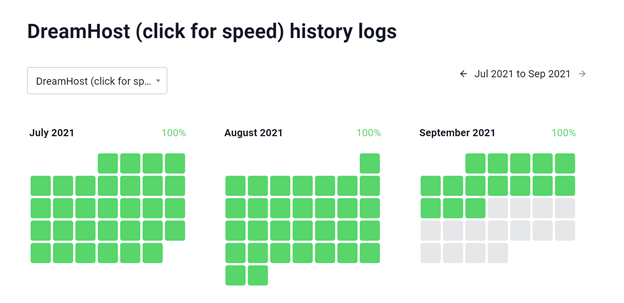
When it comes to uptime, DreamHost and SIteGround are reliable, keeping their promise of 99.9% uptime. From the data above, you can see that since July 1st, both hosting providers have experienced no downtime. If you want to check their live data, you can visit this uptime monitor page.
Both use Solid State Drive (SSD) in their servers, with SiteGround using Nginx, and DreamHost using Apache. At a closer look, SiteGround is the winner when it comes to speed and performance because of consistent response time and custom caching even on cheaper plans.
Privacy & Security
When it comes to data security, SIteGround is a clear winner, with 194 data centers worldwide. All plans come with free SSL and unlimited databases. However, if you want to increase your website’s security, both hosting providers offer paid add ons, with DreamSHield on DreamHost and SG Site Scanner on SiteGround. These add ons include daily malware scans, automatic malware removal, and added advanced security features.
ModSecurity, a web application firewall, can be enabled on DreamHost and is installed on all SiteGround shared hosting plans.
Data Security | ||||
|---|---|---|---|---|
Model Name | Backups | Data Centers | Free SSL | Databases |
Shared Starter | Daily | 2 | Available | 6 |
Shared Unlimited | Daily | 2 | Pre-Installed | Unlimited |
StartUp | Daily | 194 | Available | Unlimited |
Grow Big | Daily | 194 | Available | Unlimited |
Go Geek | Daily | 194 | Available | Unlimited |
Support
DreamHost customer service offers 24/7 ticket support with its live chat from 3:00 AM to 9:30 PM Pacific Time. You can also opt-in for a phone callback, but you may need to subscribe to a monthly service or pay a one-time fee.
SiteGround customer service, on the other hand, offers 24/7 phone, live chat, and phone support. Apart from that, it has an extensive knowledge base that can support you if you don’t feel like asking for professional help.
Extra Services | |||
|---|---|---|---|
Model Name | WordPress Installation | Support Options | Email Accounts / Storage |
Shared Starter | Built-In | 24/7 | Not Free |
Shared Unlimited | Built-In | 24/7 | Unlimited |
StartUp | One-Click Installation | 24/7 / Phone, Chat & Tickets | Unlimted / 10 GB |
Grow Big | One-Click Installation | 24/7 / Phone, Chat & Tickets | Unlimted / 10 GB |
Go Geek | One-Click Installation | Advance Priority | Unlimted / 10 GB |
Email Configuration
All of SiteGround’s shared hosting plans and DreamHost Share Unlimited come with an email service that features webmail, SMTP, and POP3. You also have the option to add email to DreamHost’s Shared Starter plan for a small monthly fee. SiteGround’s email setup and DreamHost webmail configuration are both straightforward and don't require complicated settings.
Discounts, Promo & Coupon Codes
Discounts and promos are always given upfront when you sign up for any of the services. If you want to get more value, pay for more than one month upfront. SiteGround and DreamHost both offer three-year contracts so that you can lock in the lower rates for a significant amount of time. However, once the period covered by your first invoice is finished, you’ll need to pay the full price moving forward.
SiteGround plans are discounted by more than 50% for new customers, so if you recently just signed up with SiteGround, your monthly hosting fees will increase significantly as you renew your plan. On the other hand, DreamHost doesn't offer many discounts on new sign-ups since the initial price and the full price difference aren't that significant.
Ease Of Use
SiteGround cPanel access was changed last 2019 to a new 100% custom hosting dashboard called Site Tools. For beginners, this new dashboard is easy to use, but cPanel fans may disagree. The new dashboard gives you a detailed area for every website in your account. Here, you can pin different tools that you usually use on the top of the dashboard, and on the sidebar, you have the option to navigate to different tools.
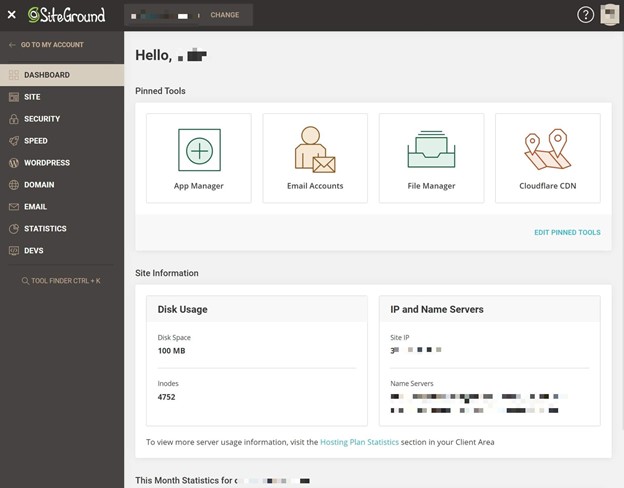
In this dashboard, you can also easily navigate to WordPress > Staging, where you can create and manage all your staging sites, which are simply a copy of your site stored in a safe sandbox that you can use for testing new features. You also have the option to push your staging site live to overwrite the current live version of your site. Overall, the SiteGround dashboard is straightforward to navigate, with all the important settings quickly accessible.
DreamHost also features a 100% custom dashboard. However, it doesn’t have as many tools as what SiteGround cPanel offers. The main dashboard gives you an overview of your account, and you can use the left side to jump around various settings or let DreamHost suggest which parts of the dashboard are the most important.
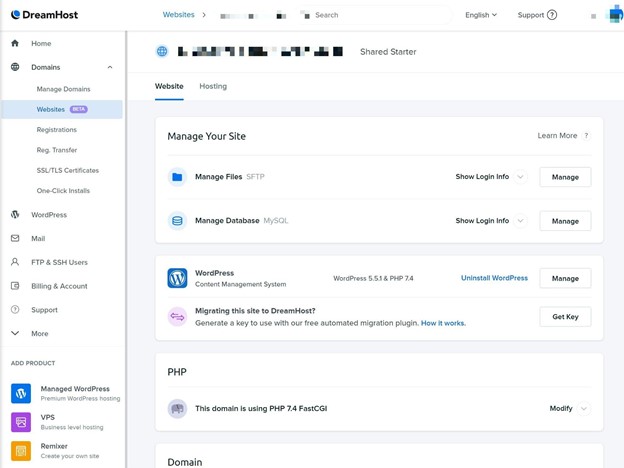
If you want to access all your websites, you can go to the Domains setting on the left-side navigation. The dashboard also features some useful tools such as phpMyAdmin to manage your site’s database, an in-browser file manager tool (in addition to SFTP access), and a whole lot more.
While the custom DreamHost cPanel has a learning curve before you master it, it’s relatively easy to use after that.
Domain Registration Costs
DreamHost offers its .com domains starting at $7.99 for new registration, $17.99 for renewal, and $9.99 for transfers. The price varies depending on the domain name and top-level domain. But you can get a free one-year domain registration for specified TLDs on every annual plan. For example, SiteGround domain registration and renewal start at $17.99. Unfortunately, shared hosting plans offered by SiteGround do not come with free domain registration.
Best For?
If you are starting a WordPress blog or a website on a tight budget, DreamHost is the ideal choice. It offers flexibility with room for growth, and several freebies like domain and SSL, so there’s not much investment you need for your first website. However, if you have an established website or a digital agency, SIteGround is a better choice with the advanced feature and support it offers.
Comparisons with Popular Hosting Alternatives
SiteGround vs BlueHost vs DreamHost

Like DreamHost and SiteGround, BlueHost also offers affordable shared web hosting. However, with Bluehost, you get to have more options as this provider provides four different plans, depending on what your website needs. When it comes to speed and performance, it may be the least of the three, but it still is a competitive and reliable host. If you want to know more about BlueHost, you can check out this in-depth comparison.
SiteGround vs GoDaddy vs DreamHost
If you’ve already done a bit of research, you’re probably familiar with GoDaddy by now. Unlike SiteGround and DreamHost, GoDaddy isn’t just a hosting company; it also operates in domain registration and website building, which means that the company can easily provide free extra features that the other two can’t offer. However, GoDaddy has a steeper price compared to its competitors. Read this to find out more about GoDaddy vs. SiteGround.
SiteGround vs HostGator vs DreamHost

All of these hosting companies are best for beginners, offering outstanding performance and a high uptime rate. However, what sets HostGator apart from the other two is that it provides a better guarantee for its uptime and promises a free month of hosting if its uptime rate falls below 99.9%. Learn more about HostGator vs. SiteGround here.
People Also Ask (FAQs)
Does Siteground use wordpress.org or wordpress.com?
SiteGround uses wordpress.org and is recommended by the CMS company to its users. With wordpress.com, they do all the hosting for you, unlike it’s.org counterpart where you can choose your own.
Does DreamHost use wordpress.org or wordpress.com?
All WordPress sites hosted by DreamHost use a customized version of wordpress.org code, providing everything they need for their WordPress site. So if you have a WordPress site at DreamHost, you don’t need any additional software from worpress.org and wordpress.com.
Does Siteground use Cpanel?
No, SiteGround does not use cPanel anymore. Instead, in 2019, SiteGround started using a 100% customized dashboard that’s easy to navigate. It also has all the tools you need to manage your website.
Does DreamHost use Cpanel?
DreamHost does not use cPanel. Instead, it uses a custom-build dashboard where you can manage your websites, databases, emails, billing, and more. It’s not as intuitive as SiteGorund’s dashboard, but you can easily get used to it.
Where is DreamHost located?
DreamHost is located in Los Angeles, with all of its data centers based in the United States.
Where is SiteGround located?
SiteGround was founded in Sofia, Bulgaria but now has offices in Sofia, Plovdiv, Stara Zagora, and Madrid, Spain.
How long does a SiteGround migrator take?
Depending on the size of the website, migration may take up to 5 days. But if it’s a WordPress migration, it wouldn’t last longer than 24 hours.
Conclusion
Remember, choosing web hosting comes down to your personal choice and budget. When it comes to features, performance, and support, SiteGround is the clear winner. However, DreamHost’s performance isn’t too bad, offering more affordable plans with user-friendly dashboards. So no matter what you choose, you know that both are reliable and give value to your money.